P550 Controller
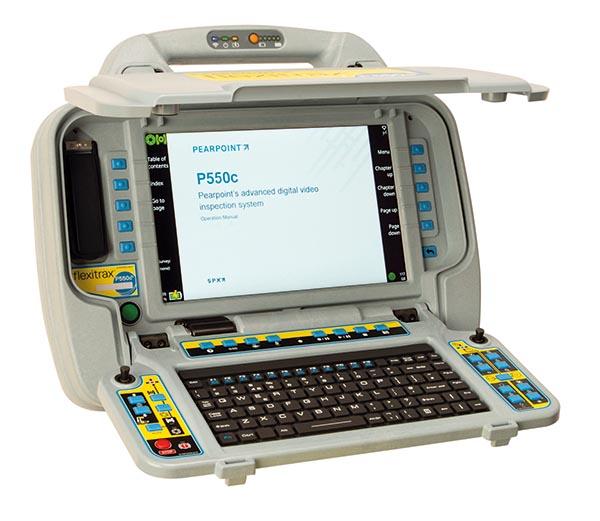
The flexitrax™ P550c controller is designed entirely for ease of use and supports simple and efficient creation of inspection reports. Intuitive menus and dedicated function keys guide you through your current inspection so that the next job doesn’t have to wait.
Thanks to MSCC3-, 4-, or 5-compliant reports and the integrated Wi-Fi, you can share your reports on-site via email or Dropbox. Alternatively, you can copy them directly onto a USB flash drive using one of the three USB ports.
Your colleagues and/or clients can follow your video inspection in real time using a standard web browser on their local network-connected device (e.g., smartphone or tablet).
Easy to operate, low maintenance
The flexitrax P550c system offers an intuitive graphical user interface, a full PC keyboard (regional options available), and at startup a selection of 6 different menu languages with integrated user manuals. Context-sensitive ATM keys on both sides of the display provide access to user-friendly menus, while an additional 8 keys allow direct control of frequently used functions (e.g., recording or cable zeroing).
The flexitrax P550c features a 12.1-inch HD display with 1280x800 pixels for clear and sharp images, as well as an internal 128 GB memory providing more than 2 months of video recording under normal usage conditions¹. The integrated battery and robust IP55-rated housing provide reliability and ease of use even in the toughest environments.
¹ Normal usage defined as 100 minutes of video recording per day, 5 days per week.
On-site reporting
The flexitrax P550c includes report templates according to several standards such as WRc MSCC3, 4, or 5, as well as your own. Reports are available immediately after the inspection is completed.
Optional WinCan compatibility² is available either at the time of purchasing the flexitrax P550c system or later as an upgrade option.
² May require a separate WinCan license.
Fast, intuitive inspection
A short startup time, 10 context-sensitive keys on the sides of the display, and 7 additional keys for frequently used tasks create an inspection system that is quick to set up and easy to operate.
Intuitive menus guide you through the inspection without requiring you to remember complicated key combinations. With just a few button presses, you can share the report with your clients or office and immediately proceed to the next inspection.
Six menu languages and language-specific keyboard layouts are available (English, French, German, Spanish, Dutch, and Simplified Chinese). More languages are already in development.